Withdrawing money from Revolut is straightforward, but the method you choose determines how quickly you receive your funds and whether additional charges apply.
UK customers can transfer money to another bank account, withdraw cash through an ATM or move funds from Revolut savings and investment products.
To withdraw money from Revolut to a UK bank, open the app, select Payments, tap the + icon, choose Bank, enter the recipient’s details and confirm the transfer. If you need physical cash, you can use an eligible Revolut card at a supported ATM.
However, understanding the withdrawal limits matters, particularly for freelancers, business owners and customers who regularly transfer larger balances.
We analysed Revolut’s published 2026 withdrawal conditions, transfer arrangements and cash-access charges to explain the practical considerations for 2027.
This guide reflects the published rules available in November 2026. Always check the app for changes to fees or limits introduced during 2027.
What Is the Best Way to Withdraw Money From Revolut?
The most suitable method depends on whether you need cash, want to move money into another bank or need access to savings.
| Withdrawal method | Typical processing time | Main consideration |
| UK bank transfer | Within hours; can take one business day | Free for domestic GBP transfers |
| ATM cash withdrawal | Immediate if successful | Monthly fee-free allowances apply |
| Revolut-to-Revolut transfer | Usually instant | Useful for transferring to another customer |
| Savings withdrawal | Usually immediate | Move funds into your main Revolut balance |
| Investment withdrawal | After trade settlement | Settlement can take one or two trading days |
For most UK customers, a domestic bank transfer is the more economical choice when moving a substantial balance. ATM withdrawals are better suited to situations requiring physical cash.
How Do You Withdraw Money From Revolut to a UK Bank Account?
Transferring money to a traditional bank is one of the simplest methods of accessing your Revolut balance without withdrawing physical cash.
The procedure works with supported UK accounts, including Barclays, Lloyds, HSBC, NatWest and Nationwide.
Follow these steps:
- Open Revolut: Sign in and confirm that your available balance covers the transfer.
- Select Payments: Tap Payments on the bottom navigation menu.
- Add a recipient: Tap the + symbol and choose Bank.
- Enter bank details: Provide the recipient’s full name, six-digit sort code and eight-digit account number.
- Choose the amount: Select GBP and enter the amount you want to transfer.
- Confirm the payment: Review the recipient details, estimated arrival and any charges before sending.
For further detail on setting up a recipient and monitoring payments, see our explanation of how to transfer money from Revolut to a bank account.
Practical example: Suppose you have £1,500 in Revolut and want to move it to your Lloyds account. A standard domestic GBP bank transfer carries no Revolut transfer fee, so the full £1,500 can be transferred, provided no other charges or restrictions apply.
This makes bank transfers particularly useful for people consolidating money across several financial accounts.
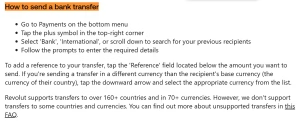
Official Revolut instructions showing Payments, the + icon, Bank recipient selection and the information required to send money.
How Can You Withdraw Cash From Revolut at an ATM?
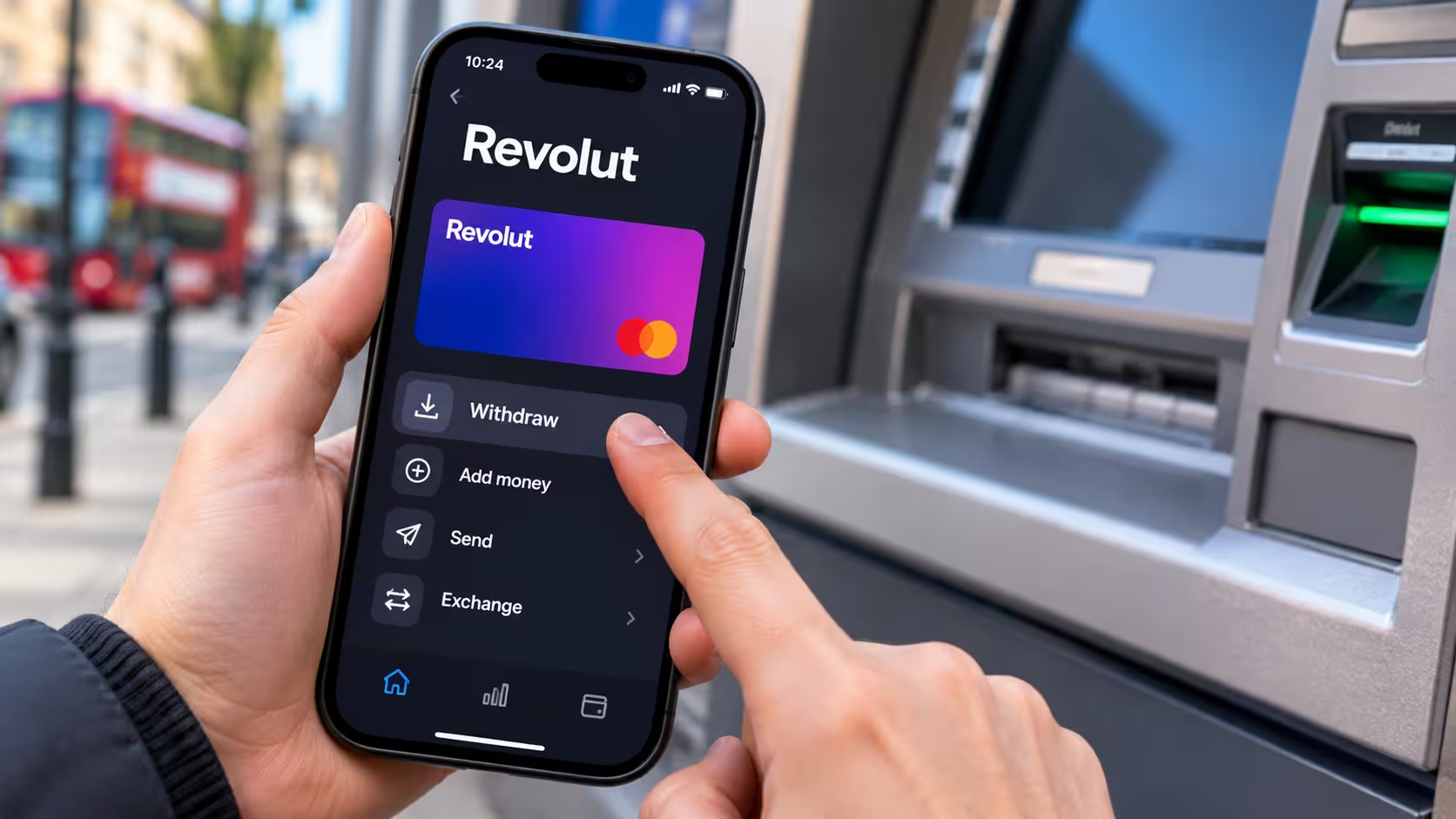
Revolut customers can access physical cash through ATMs that support their card network.
The process is similar to withdrawing money using another UK debit card:
- Open Revolut and check that the physical card is active.
- Confirm cash withdrawals are enabled in the card settings.
- Use the in-app ATM locator to find a nearby machine.
- Insert your Revolut card and enter its PIN.
- Choose the withdrawal amount, confirm the transaction and collect your cash.
Revolut also supports eligible contactless ATM withdrawals using the digital-wallet version of a physical card. A virtual-only Revolut card cannot be used for ATM cash withdrawals.
If you regularly withdraw significant amounts of money, understanding how much cash you can withdraw from an ATM is useful because Revolut’s limits and individual ATM restrictions can differ.
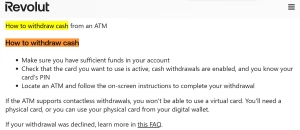
Revolut’s official cash withdrawal instructions, including card requirements and the option to find nearby ATMs.
What Are the Revolut Withdrawal Limits and Fees for 2027?
Revolut’s latest verified UK personal-account rules distinguish between the maximum amount that can be withdrawn and the amount available without a Revolut cash withdrawal fee.
The published 2026 allowances are:
| Revolut plan | Fee-free ATM allowance per rolling month | Fee after allowance |
| Standard | £200 or 5 withdrawals, whichever comes first | 2%, minimum £1 |
| Plus | £200 | 2%, minimum £1 |
| Premium | £400 | 2%, minimum £1 |
| Metal | £800 | 2%, minimum £1 |
| Ultra | £2,000 | 2%, minimum £1 |
These are the verified 2026 allowances, not guaranteed 2027 prices.
Revolut also publishes a maximum personal ATM withdrawal limit of £3,000 or its currency equivalent within 24 hours. This does not mean £3,000 is free to withdraw. ATM operators may impose smaller transaction limits or additional charges.
How Much Could an ATM Withdrawal Cost?
Consider a Standard customer who has already exhausted their monthly fee-free allowance.
| Additional withdrawal | Revolut fee | Total balance reduction |
| £20 | £1 | £21 |
| £50 | £1 | £51 |
| £100 | £2 | £102 |
| £250 | £5 | £255 |
Illustrative calculations assume the fee-free allowance has already been exhausted and exclude ATM-provider and currency-conversion fees.
Our financial analysis suggests that repeated small withdrawals can become unnecessarily expensive once the allowance is exhausted.
For customers comparing digital banks, the Monzo cash withdrawal limit provides a useful comparison because fee-free cash access varies between providers.
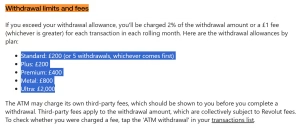
Revolut’s published personal-account ATM withdrawal allowances for Standard, Plus, Premium, Metal and Ultra plans.
How Long Does It Take to Withdraw Money From Revolut?
Withdrawal times depend on the payment method, currency and receiving institution.
Under Revolut’s published UK transfer guidance:
- UK Faster Payments: Usually within a few hours, but can take up to one business day.
- SEPA Instant: Generally within minutes.
- Regular SEPA: Up to two business days.
- International SWIFT: Published standard timeframes can be up to two business days, although additional checks and intermediary banks may cause delays.
- ATM withdrawals: Cash is normally dispensed immediately after successful authorisation.
Transfers can occasionally be delayed by verification checks, incorrect receiving details, holidays or technical issues.
For people using Revolut to receive freelance income, an important cash-flow principle is to avoid relying on an incoming transfer until the money is available in the receiving account.
This is particularly relevant when scheduling rent, payroll or time-sensitive supplier payments.
How Do You Withdraw Money From Revolut Savings, Pockets or Investments?
A common misconception is that every balance shown within Revolut can be withdrawn through an ATM immediately.
In practice, money held in certain products must first be moved into the main Revolut account.
| Where the money is held | How to access it |
| Main Revolut account | Bank transfer or ATM withdrawal |
| Personal Pocket | Move funds into the main account |
| Instant Access Savings | Select the Savings account and move the money |
| Investment account | Withdraw available settled cash |
| Stocks and Shares ISA | Follow the applicable investment withdrawal and settlement process |
- For Pockets: Open Home, select Accounts, choose the Pocket and tap Move. Group Pocket withdrawals depend on the permissions granted by its administrator.
- For Savings: Open Home, choose Accounts, select the relevant Savings account and tap Move. Revolut’s UK Instant Access Savings guidance states that withdrawals into the main account should normally be free and immediate.
- For Investments: Open Invest and select Withdraw. Sale proceeds generally become withdrawable after settlement, normally one trading day for US securities and two trading days for UK or European securities. Market holidays can extend this period.
These distinctions are especially important for investors who need to move money to another bank after selling assets.
Customers familiar with withdrawing money from Trading 212 will recognise the difference between selling an investment and having settled funds available for withdrawal.
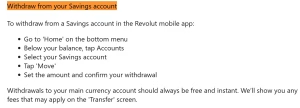
Official Revolut instructions showing how to move money out of a Savings account into the main Revolut balance.
How Can You Withdraw Money From Revolut Abroad Without Paying Unnecessary Fees?
International cash withdrawals require more attention because several different charges can apply.
When withdrawing cash in another country, Revolut customers should generally choose the local currency rather than accepting an ATM operator’s currency conversion.
This helps avoid dynamic currency conversion, where the ATM provider applies its own exchange rate.
We identified three important cost considerations.
- Monthly cash allowance: Foreign ATM withdrawals count towards the applicable Revolut withdrawal allowance.
- Currency exchange allowance: Standard customers may pay an additional 1% exchange fee after exceeding £1,000 in their rolling monthly exchange allowance. Plus customers may pay 0.5% after £3,000.
- Weekend exchange fees: Under the published 2026 conditions, additional weekend exchange fees can apply to Standard and Plus customers. Premium, Metal and Ultra customers do not pay those additional weekend exchange fees.
ATM operators can also charge independent fees, which Revolut does not control.
Someone regularly travelling for work may benefit from comparing Revolut vs Monzo and understanding whether Monzo charges abroad.
The objective should be to minimise the total cost of obtaining foreign cash, not simply compare the advertised exchange rate.
Can Freelancers and Business Owners Withdraw Money From Revolut Business?
Yes, but Revolut Business has different cash withdrawal arrangements from personal Revolut accounts.
Under its published UK Business conditions, Revolut charges 2% on every Business ATM withdrawal, regardless of the subscription plan or withdrawal amount.
For example, withdrawing £500 through a Business card would incur a £10 Revolut withdrawal fee, excluding any operator or currency charges.
This creates an important distinction for entrepreneurs.
A business owner receiving payments from clients may find electronic transfers more suitable for moving funds than repeatedly withdrawing cash.
Before selecting a withdrawal method, businesses should consider supplier payments, bookkeeping records and whether the transaction belongs to the business or represents a legitimate personal withdrawal.
Personal and company finances should also be kept appropriately separated for accounting and tax purposes.
For entrepreneurs considering other providers, our comparison of business bank accounts examines factors such as account costs, payment services and everyday banking requirements.
Why Is Revolut Not Letting You Withdraw Money?
Withdrawal problems do not always indicate that the account has been blocked.
Sometimes the issue involves card settings, unavailable funds, payment verification or limitations imposed by the ATM operator.
| Problem | What to check |
| ATM declines the withdrawal | Card activation, PIN, cash settings and account balance |
| Transfer remains pending | Estimated arrival time and any verification requests |
| Withdrawal exceeds the limit | Daily limit, card controls and ATM restrictions |
| Available balance is too low | Pending payments or money held in another account |
| Investment money cannot be withdrawn | Whether the trade has settled |
| ATM does not dispense cash | Transaction status and the ATM operator’s support process |
To investigate an unsuccessful transaction, open Revolut, select the transaction in your history and review its status.
For additional help, use Revolut’s secure in-app support rather than responding to unsolicited messages claiming to offer withdrawal assistance.
Account restrictions and fraudulent payment concerns deserve particular attention. Our examination of whether Revolut is safe explains the relevant protection and security considerations, while our discussion of common Revolut problems covers wider customer concerns.
If an ATM has debited your balance but failed to dispense cash, retain the transaction details and contact the ATM operator. Revolut support can assist with investigating the transaction through the app.
What Should You Check Before Withdrawing Your Entire Revolut Balance?
Withdrawing all available funds may seem like a minor financial decision, but it can disrupt other payment arrangements.
Before transferring everything, review any outstanding card payments, Direct Debits, subscriptions and scheduled transfers.
For someone using Revolut as an everyday spending account, leaving no available funds could cause upcoming payments to fail.
For freelancers and entrepreneurs, moving the full account balance may also affect software subscriptions, recurring business expenses or supplier settlements.
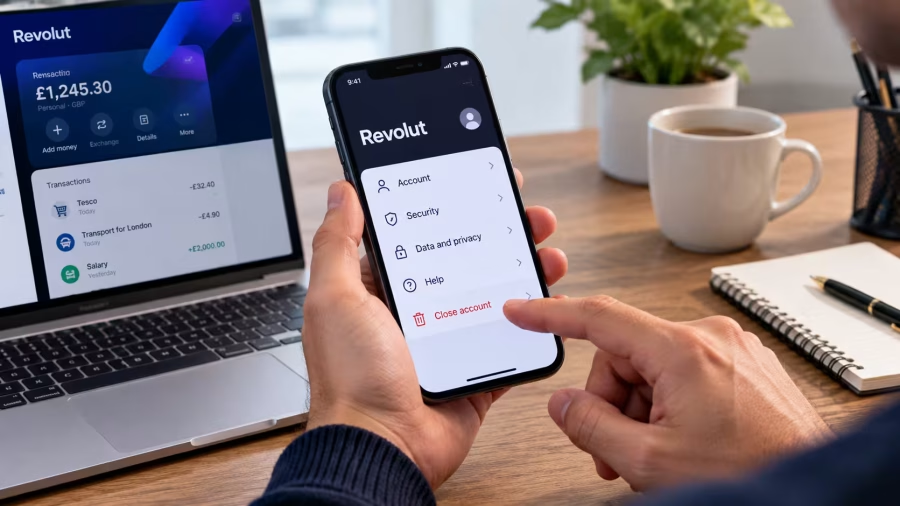
If the intention is to stop using Revolut permanently, withdrawing money is only one part of closing a Revolut account. Savings products, investment accounts and pending transactions may also need attention.
Final Thoughts
Withdrawing money from Revolut in 2027 should remain a manageable process for UK customers, but the actual cost depends on the withdrawal method and account plan.
Our analysis indicates that domestic GBP bank transfers are generally the most economical way to move larger balances, while ATM withdrawals offer immediate access to physical cash within specific allowances.
Customers should also distinguish between ordinary account balances, Savings, Pockets and investment funds.
Understanding these differences, checking transaction limits and reviewing the applicable fees before confirming a withdrawal can help individuals and businesses maintain better control over their money.
Frequently Asked Questions
Can I Withdraw Money From Revolut Without a Physical Card?
Yes. You can transfer funds to another bank account without a physical card. For ATM withdrawals, a physical card or an eligible digital-wallet version of a physical card is required.
Can I Transfer £10,000 From Revolut to My UK Bank?
Potentially, yes. Revolut supports large transfers, but applicable limits, verification checks and security controls can affect individual payments. The app will show whether your proposed transfer is permitted.
Is It Free to Withdraw Money From Revolut?
Domestic GBP bank transfers within the UK are free of Revolut transfer fees. ATM withdrawals are free of Revolut’s cash withdrawal charge only within the applicable plan allowance, and ATM-provider fees can still apply.
Can I Withdraw Money From Revolut Into My Lloyds Account?
Yes. Add your Lloyds account as a bank recipient using the correct sort code and account number. If you prefer physical cash, check the maximum ATM withdrawal at Lloyds alongside your Revolut limits.
Can I Withdraw All My Revolut Money at Once?
You can generally transfer your available balance, subject to payment limits, verification and any outstanding transactions. ATM withdrawals have separate daily and monthly restrictions.
Can I Withdraw Money From Revolut If My Account Is Restricted?
A restriction may prevent some or all withdrawals while Revolut completes its checks. Review the instructions displayed in the app and supply any requested verification documents through official channels.